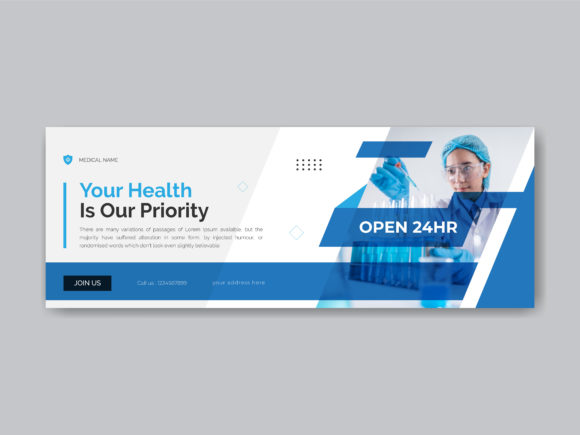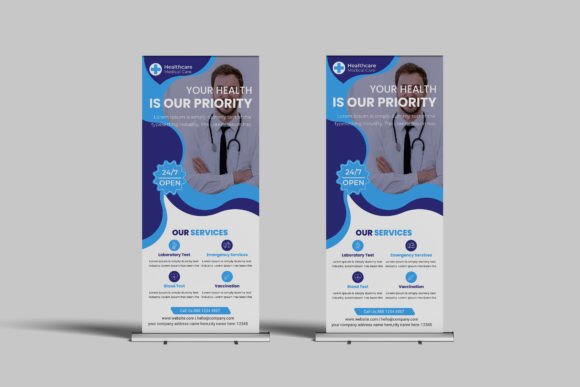
Medical Facebook Cover Design Template: Professional Branding Made Simple
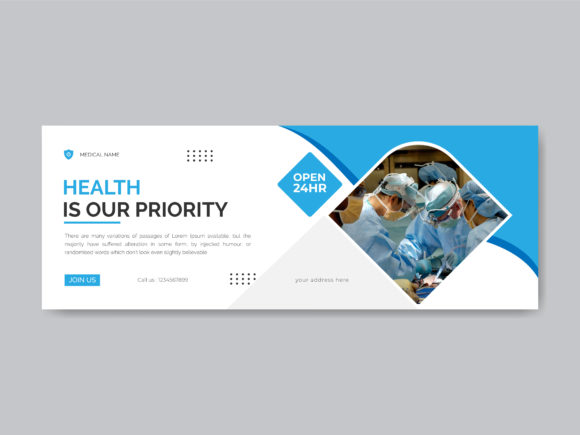
When you run a healthcare practice, clinic, or wellness brand, your Facebook page is often the first place potential patients or clients check. A Medical Facebook Cover Design Template gives you a polished, professional starting point without hiring a designer or spending hours wrestling with software. This particular template measures 851px by 315px, which fits Facebook's cover photo dimensions perfectly. No awkward cropping, no blurry stretches. Just a clean, properly sized canvas ready for your brand.
The visual personality of this template leans toward modern healthcare aesthetics. Think calm color palettes, clean lines, and balanced whitespace. Medical design tends to avoid overly decorative elements in favor of clarity and trust. A good template in this space communicates competence at a glance. You want someone landing on your page to immediately feel they are dealing with a legitimate, caring, and organized practice. That emotional response happens within seconds, and your cover image plays a huge role in shaping it.
What Makes This Template Stand Out
This Medical Facebook Cover Design Template ships as an AI CC file, meaning it opens in Adobe Illustrator Creative Cloud. That alone puts it a step above many generic templates that come flattened or locked in raster formats. Because it uses smart layers and fully editable files, you can swap out colors, adjust text, move elements around, and resize components without degrading quality. Every designer knows the frustration of downloading a template only to find half the elements are rasterized and impossible to modify. That is not the case here.
The layers are well organized, which matters more than people realize. When you open the file and see clearly labeled groups for text, icons, background elements, and imagery, customization becomes intuitive. You do not need to hunt through dozens of unnamed layers trying to figure out which rectangle controls the header bar. This kind of organization saves real time, especially if you are a small business owner managing your own marketing rather than a full-time designer.
Another practical detail: the template uses free Google Fonts. This is a significant advantage for anyone working within a budget. You do not need to purchase additional premium font licenses just to match the preview. The typography included is accessible, widely supported, and easy to install. For a medical or healthcare context, clean sans serif font choices tend to work best because they convey modernity and readability at small sizes, which matters when Facebook compresses images on mobile devices.
Where This Template Works Best
Healthcare is broad, and this Medical Facebook Cover Design Template adapts well across different sub-niches. General practitioners, dental offices, physical therapy clinics, mental health counselors, veterinary practices, and even health-focused startups can use it as a foundation. The RGB format color at 150 DPI is optimized for screen display, which is exactly where a Facebook cover lives. You are not printing this on a brochure. It needs to look sharp on monitors, tablets, and phones, and the specifications reflect that purpose.
Beyond healthcare, the template's clean structure makes it useful for wellness bloggers, fitness coaches, nutrition consultants, and pharmaceutical brands. Anyone operating in the broader health and wellness space benefits from a cover design that signals professionalism without feeling sterile or cold. The best medical branding strikes a balance between clinical authority and human warmth. A well-designed template helps you hit that balance even if design is not your primary skill.
From a brand identity perspective, your Facebook cover is part of a larger visual system. It should work alongside your profile picture, your post graphics, your website, and any printed materials. Because this template is fully customizable, you can match it to your existing color scheme, incorporate your logo, and use font pairing strategies that align with your other design assets. Consistency across touchpoints builds recognition, and recognition builds trust. That is not theory. It is how people process brands in the real world.
Practical Tips for Customization
Start by replacing the placeholder text with your practice name, tagline, and a simple call to action. Keep the copy short. Facebook covers are visual first and textual second. A phone number, website URL, or a brief phrase like "Now Accepting New Patients" works well. Avoid cramming paragraphs into the space. The visual hierarchy should guide the eye naturally from the most important element downward.
When adjusting colors, stick to two or three tones maximum. Medical brands often work with blues, greens, whites, and soft neutrals because those colors psychologically associate with health, cleanliness, and calm. If your practice already has established brand colors, apply them here. The editable nature of the template makes this straightforward. Just select the elements you want to change and input your hex codes or use the color picker.
For imagery, consider using a high-quality photo of your team, your facility, or a relevant medical context. Make sure the photo has good lighting and a professional feel. Stock photos can work, but authentic images of real people tend to generate stronger engagement on social media. Position the photo so it does not compete with your text. The template's layout should help with this, as the well organized layers allow you to adjust placement and opacity easily.
Test your final design across devices before publishing. What looks balanced on a desktop monitor might crop differently on a mobile phone. Facebook displays cover images differently depending on the device, and the safe zone for text and key elements is roughly the center portion of the image. Keep critical information away from the top and bottom edges where cropping is most likely to occur.
Why File Format and Specs Matter
The AI CC format ensures you are working with vector-based elements wherever possible. This means your text and shapes remain crisp at any resolution. If you ever need to repurpose elements of this design for other social media graphics, print materials, or web design assets, the vector foundation makes scaling painless. You could pull a logo element from the cover and use it on a business card without quality loss.
The 150 DPI specification is standard for digital display. Some people assume higher DPI is always better, but for screen-only use, 150 is perfectly adequate and keeps file sizes manageable. The RGB color mode is correct for any digital output. If you ever need a print version, you would convert to CMYK, but that is a separate workflow.
Having access to free Google Fonts means your entire team or collaborators can access the same typefaces without licensing complications. This is particularly helpful if you work with a virtual assistant or a part-time social media manager who handles your posting. Everyone can open the file, make updates, and export without running into missing font errors or legal gray areas around commercial font usage.
Final Thoughts on Getting the Most from This Template
A Medical Facebook Cover Design Template is not a magic solution for bad branding, but it is a genuinely useful tool for anyone who needs a professional-looking cover image without a steep learning curve or a big budget. It respects your time by being logically organized, respects your wallet by using free fonts, and respects your creative control by being fully editable. Whether you are a solo practitioner updating your online presence or a marketing manager refreshing a clinic's social channels, having a reliable template in your toolkit makes the process faster and the result more consistent.
Take the time to customize it thoughtfully. Match it to your brand, keep the design clean, and remember that your Facebook cover is a handshake. Make it firm, make it confident, and make it memorable.