Urban Dashboard V2: Your Fashion E-commerce Command Center
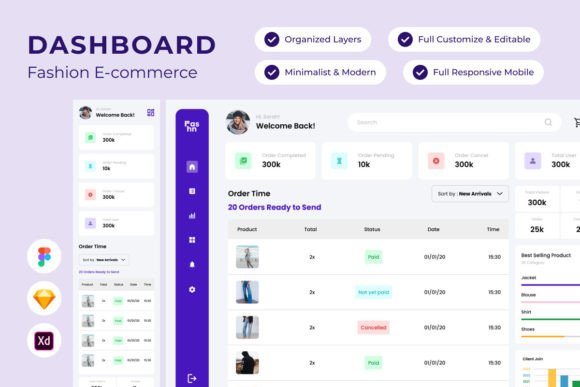
Running a fashion brand online feels like spinning plates. Orders come in, inventory shifts, customer inquiries pile up, and you're supposed to be tracking growth while also creating new products. Most dashboard tools treat this chaos with bland, utilitarian interfaces that drain your energy before you even start your day. Urban - Dashboard Fashion E-commerce V2 takes a different approach entirely—it gives you a workspace that actually feels good to use.
Why Your Dashboard Design Matters More Than You Think
Here's something most e-commerce owners overlook: you spend hours inside your dashboard every single week. That interface shapes your mood, your decision-making speed, and honestly, how professional you feel about your own business. A cluttered, poorly organized admin panel creates mental friction. You hunt for data, squint at tiny charts, and waste time navigating menus that make no sense.
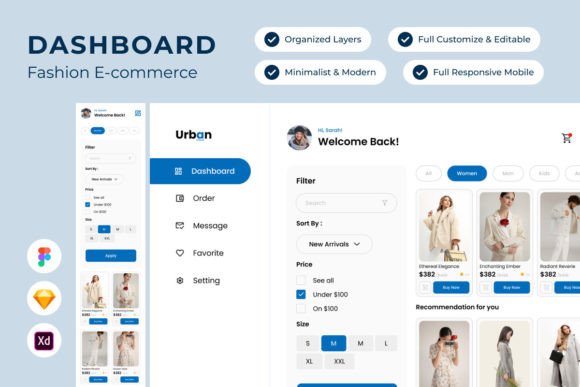
Urban V2 solves this with modern dashboard design that prioritizes clarity without sacrificing visual appeal. The layouts for both desktop and mobile versions feel contemporary and intentional. Think clean card-based layouts, generous whitespace, and a color palette that actually reflects the fashion industry's aesthetic sensibility. This isn't generic gray-and-blue corporate software. It's a visual environment designed for people who care about how things look—because you're in the business of how things look.
The personality here leans sophisticated but approachable. It avoids the cold minimalism that makes dashboards feel sterile, and it sidesteps the overdesigned trendiness that ages poorly within months. Urban Dashboard V2 strikes that middle ground where modern typography meets functional elegance.
Designed for Real Workflow, Not Just Screenshots
What sets this toolkit apart from other design assets floating around the market is how thoughtfully the layers and components are organized. Anyone who has wrestled with a messy Figma file knows the pain of hunting through poorly named groups and inconsistent spacing. Urban V2's layers are well organized and neat, which means you can actually customize it without losing your mind.
The design is easy to adjust—colors, typography, layout structure, component sizing. If you're a designer building a client project or an entrepreneur tweaking things yourself, this flexibility matters enormously. You're not locked into someone else's rigid template. You get a foundation that adapts to your specific brand needs.
Compatibility across Figma, Sketch, and Adobe XD means your preferred workflow isn't an obstacle. Whether you prototype in Figma or finalize in XD, the files translate cleanly. The inclusion of open source fonts eliminates licensing headaches, and the free vector icons give you a consistent icon library without hunting through external resources. Global text and color styles keep your design system coherent, so when you change a primary color or heading size, it cascades through the entire dashboard predictably.
Who Benefits Most from Urban Dashboard V2
Fashion entrepreneurs launching their first Shopify or WooCommerce store will find this especially valuable. You get a professional-looking backend concept that helps you plan your actual platform's layout before committing to development. Instead of guessing how your order management or analytics views should look, you have a polished reference point.
Designers and agencies serving fashion clients—this is a practical starting point for web design projects. You can present dashboard concepts to clients that feel real and tangible rather than wireframe-level rough sketches. The visual fidelity here supports actual stakeholder conversations about functionality and layout priorities.
Small business owners who handle their own tech will appreciate the intuitive structure. You don't need an advanced design degree to understand how the components work together. The brand identity elements are clear enough to customize without professional help, though having a designer refine things certainly helps.
Making the Most of This Design System
Start by exploring the full component library before diving into customization. Urban V2 includes multiple page layouts—order management, customer profiles, analytics dashboards, product catalogs, and more. Understanding what's available prevents you from rebuilding something that already exists in the file.
When adjusting for your own brand identity, work with the global text and color styles first. Change your brand colors at the style level rather than manually recoloring individual elements. This approach maintains consistency and saves significant time. The font pairing suggestions within the system work well together, but don't hesitate to swap in your own typeface choices if your brand guidelines demand it.
Test the mobile layouts early and often. Fashion e-commerce sees massive mobile traffic, and Urban V2's mobile version isn't an afterthought—it's a genuinely usable responsive adaptation. Check how your product grids, order tables, and navigation patterns feel on smaller screens.
Remember that all images are used for preview purposes only and aren't included in the final file. Plan your own photography and product imagery strategy separately. This actually works in your favor because your dashboard mockups will look authentically yours rather than filled with stock placeholders.
A Practical Tool That Respects Your Time
Urban - Dashboard Fashion E-commerce V2 doesn't promise to revolutionize your business overnight. What it does offer is a thoughtfully constructed, visually refined starting point that saves you design time and elevates the quality of your e-commerce planning. Whether you're mapping out a new store's admin experience, presenting concepts to clients, or refining your own operational tools, this dashboard system gives you professional-grade design assets built specifically for the fashion space.
The sophistication isn't superficial—it's structural. Every component earns its place through genuine utility wrapped in visual clarity that fashion professionals actually want to interact with daily.